I actually ran PhotoCraft: what a 69,000-star free "Photoshop" can really do
In mid-October I built a Chinese-language navigation site that collects all 13 of ArtCraft's "free open-source Adobe alternatives" in one place (that roundup is here). The most common question in comments and DMs was: "Can any of these actually be used?"
At the time I could only repeat the official claims. This time I downloaded it and actually ran it.
Verdict up front: it handles everyday lightweight retouching, but it cannot carry professional deliverables. And I found a trap the official README does not mention.
1. Why it actually runs this time
PhotoCraft shipped v0.11.1 on 2026-10-20, and this release includes a web (WebAssembly) build — photocraft-web-0.11.1.zip, 11.5MB, which unzips into a static site.
That means: no Rust compilation, no runtime to install, open it in a browser and you have the whole editor. For anyone who wants to test the water first, this is the lowest-cost entry point.
My test environment: a Linux machine plus headless Chromium (SwiftShader software rendering, no GPU involved). The whole process:
- Download
photocraft-web-0.11.1.zipfrom the release - Start a local static server
- Open it in the browser and wait for WebAssembly to boot (about 15-20 seconds)
Once it boots you get the full editor UI: the File / Edit / Image / Layer / Type / Select / Filter / View / Window / Help menu bar, the toolbar on the left, Color / Swatches / Gradients / Patterns panels on the right, Properties / Adjustments panels, and Layers / Channels / Paths panels.
At first glance it already looks like a serious image editor.
2. Two things I actually did
1) Creating a new document
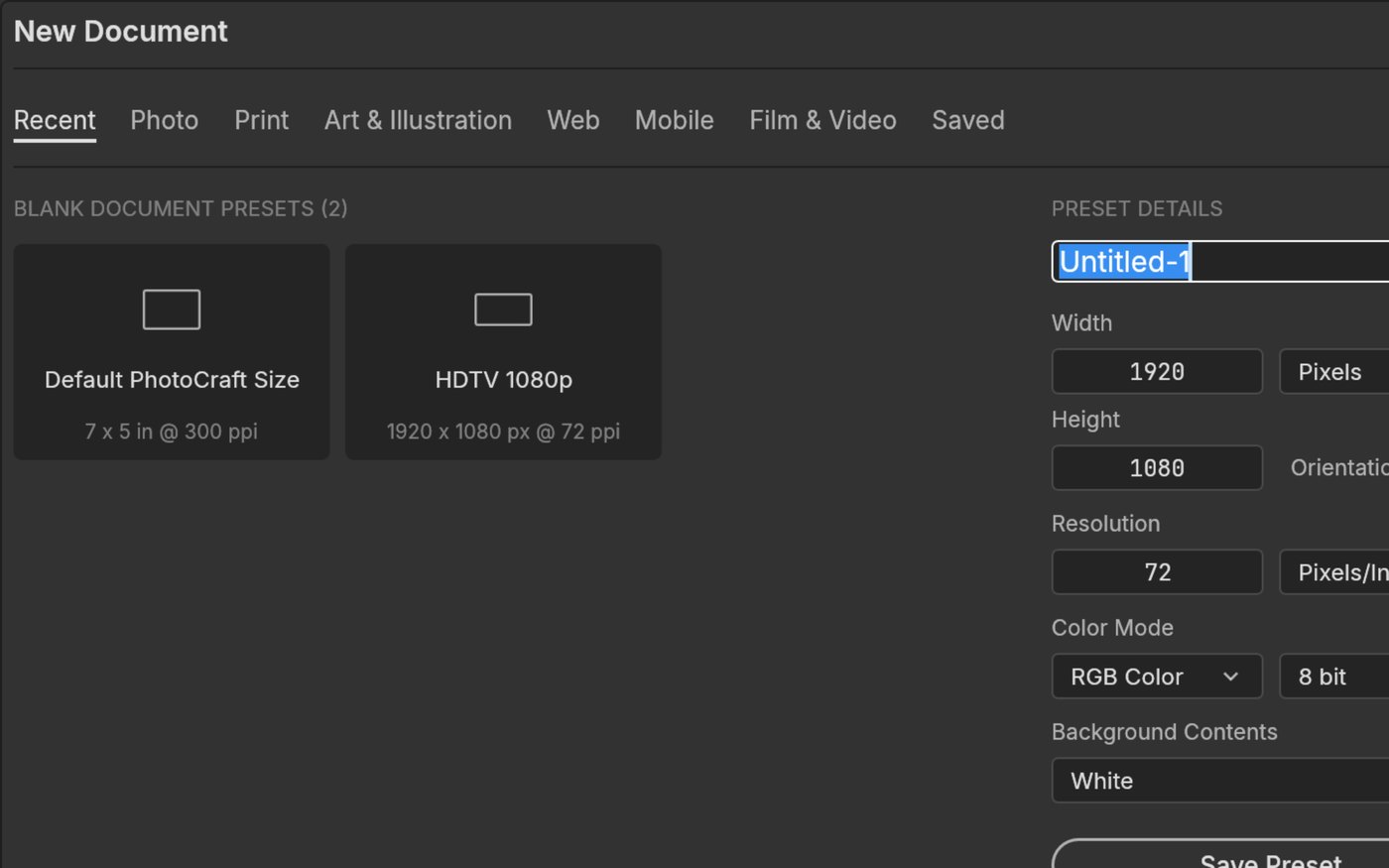
Pressing Ctrl+N brings up a full "New Document" dialog: Recent / Photo / Print / Art & Illustration / Web / Mobile / Film & Video presets, plus width, height, resolution, color mode, and background contents. Confirming creates a real 1920×1080, RGB/8 document, a Background layer appears in the Layers panel, and the status bar at the bottom shows the zoom level and canvas size.
2) Opening a real PSD
This is the important part. From ArtCraft's own test corpus, storytold/photocraft-corpus, I took a PSD with a text layer and layer styles (photoshop/text/text-with-layer-styles.psd) and loaded it with Ctrl+O.
The results:
- The tab shows
test_layers.psd @ 100% (STYLED, RGB/8) - The Layers panel correctly identifies the Type Layer (with a T icon)
- The Properties panel shows the Transform information for that layer
- The text's gradient fill and stroke render completely
- The status bar shows the document's actual size, 320px × 96px @ 72ppi
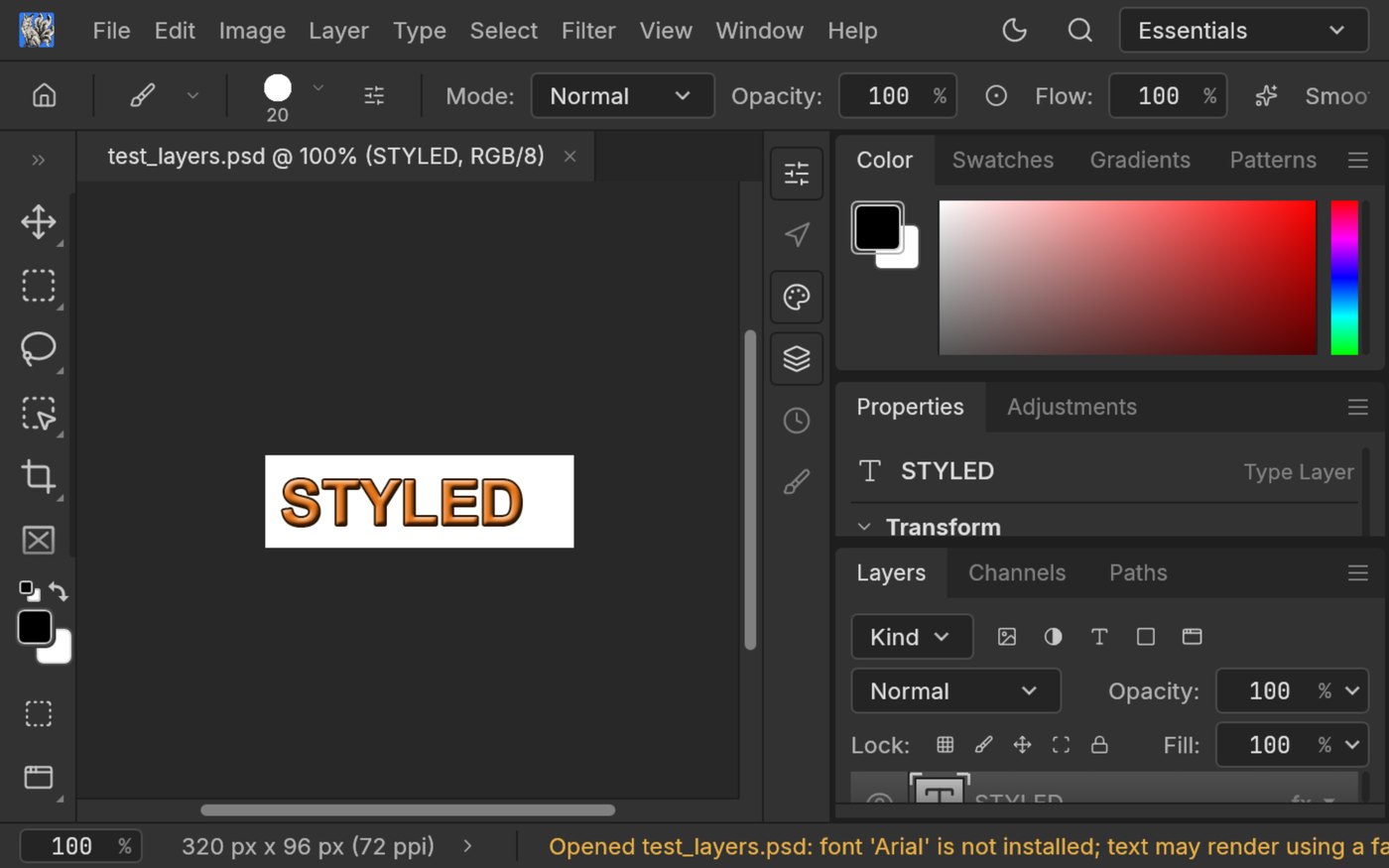
PSD read/write is not a slide-deck claim; it is real. At least for common structures like "text layer + layer styles," it works correctly.
3. Here's the trap: font fallback
I only found it because of a yellow warning in the status bar:
Opened test_layers.psd: font 'Arial' is not installed; text may render using a fallbackThat PSD used Arial. This machine does not have it, so PhotoCraft rendered with a fallback font — and the layout immediately broke.
The official README never mentions this, yet it is brutal for real workflows: a PSD is a design deliverable, and its fonts are usually on the sender's machine, not yours. If you pick up someone else's PSD and keep editing, the text layers will shift, and you may not notice until you export.
So: before editing someone else's PSD, confirm the fonts are embedded, or re-check the result in Photoshop on your own machine afterwards.
4. So what can it actually do
What it can do:
- Lightweight retouching, cropping, basic color grading
- The core Photoshop mental model: layers / masks / adjustment layers / layer styles / text / vectors
- Read and write layered PSDs (at least structures with text layers and layer styles)
- No install: the web build runs in a browser; the native build is pure Rust with a native GPU canvas and is fast offline too
- Designed for AI: the GUI / CLI / MCP interfaces share the same commands, so agents can call them directly
What it still cannot do:
- Complex smart objects, 3D, some filters
- Consistent fonts across machines (the trap above)
- Production-grade delivery: the official positioning is early alpha, and it explicitly says most features exist in some form but it cannot be a professional workhorse
My judgment: treat it as a "rehearsal space" and "second tool" for Photoshop, not a replacement.
For trying things out, learning, teaching, rolling back, or doing a first pass on work you are not sure is feasible — it is completely adequate. For commercial retouching that depends on Photoshop plugins, keep Photoshop.
5. The full 13-app comparison
I turned the 13 apps plus the launcher into a Chinese-language navigation site with official sites, GitHub links, star counts, maturity, and who each one suits; star counts update automatically every 7 days (PhotoCraft went from 61,487 on 10-15 to 69,538 on 10-21):
Each app has its own detail page covering "can it replace the original," "maturity," "three-step install," and honest notes on the pitfalls.
Sources and notes
- PhotoCraft v0.11.1 release and official repository: github.com/storytold/photocraft (written on 2026-10-21; version and star counts checked that day)
- The test PSD came from the official test corpus
storytold/photocraft-corpus - All screenshots in this article were taken from my own live run, unedited
- The navigation site is a third-party compilation, not affiliated with the ArtCraft team; always download from official channels
- This article is not a recommendation or guarantee for any software; evaluate it against your own project requirements