Real-Time Subtitle Translation in the Browser: Open It and Go, Audio Never Leaves Your Machine
Links first:
- Online version (runs directly in the browser): https://translate.cosmocat.dev/online/
- Fast desktop download (Win / Mac / Linux): https://translate.cosmocat.dev/download/
1. The problem: in a meeting with a foreigner, every missed sentence is lost
Cross-border meetings, voice messages from overseas clients, English podcasts, YouTube tutorials — what trips you up is not reading, it is real time: the sound goes by and it's gone. What you need is not "look it up in a dictionary afterwards," but "the subtitle keeps up with wherever they are in the sentence."
Existing options fall roughly into three kinds:
- Paid simultaneous interpretation services: best results, but billed by the minute, so heavy use becomes a fixed expense;
- Cloud speech tools: audio is uploaded to somebody else's server, which always raises a privacy question;
- Local open-source tools: fully on-device, free, offline — but you have to install them on every device.
2. Meet AudioScript (desktop version)
AudioScript is a free, open-source desktop tool (MIT license, upstream niyongsheng/AudioScript):
- It listens to system audio (not the microphone) and turns foreign-language podcasts, videos or meetings into real-time bilingual floating subtitles showing "original + Chinese translation";
- Recognition and translation both happen entirely on your machine — 0 audio uploads, no account needed, works with the network off;
- The floating window stays on top, and once locked it is click-through so it never steals focus; font size, opacity and line count are adjustable; Windows / macOS (Apple Silicon) / Linux supported.
Its cleverest detail: it captures system audio instead of using the microphone — while you are on a call, it translates "the sound coming out of the speakers," leaving the microphone to the call itself. That is something phone-based interpretation apps cannot do.
Downloads go through a fast domestic mirror (files are byte-identical to the official Release, with sha256 provided): https://translate.cosmocat.dev/download/
3. I built a web version of that capability: install nothing
The desktop build is good, but some situations don't allow an install, or you don't want one: a borrowed computer, a locked-down corporate device, or just wanting to try it quickly.
So I moved the whole "recognize + translate" chain into the browser: https://translate.cosmocat.dev/online/
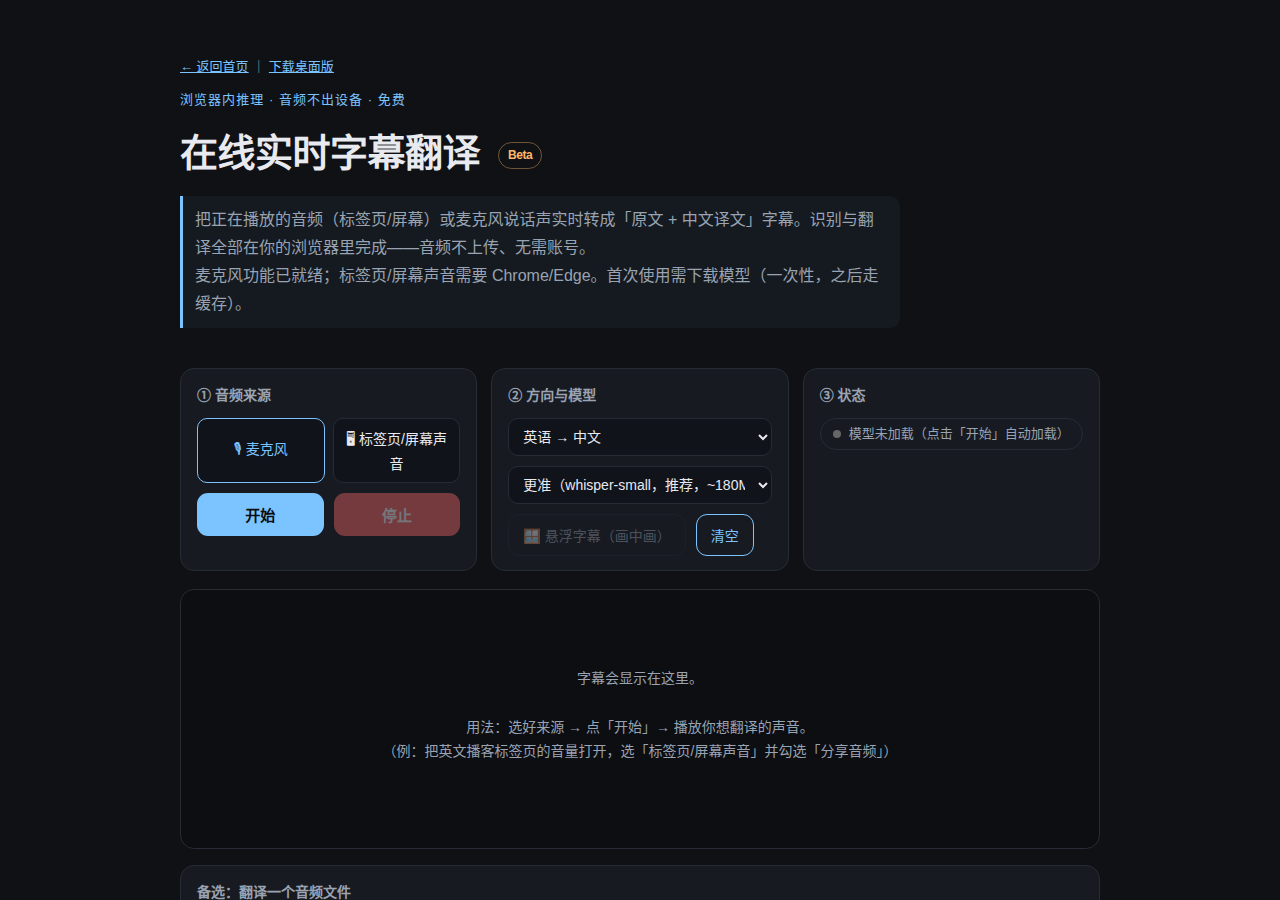
How to use it (no registration at any point):
- Open the page → press "Start" (the first time it downloads the model, about 180MB, one time only, cached by the browser afterwards);
- To translate audio that is already playing (an English podcast, video or web meeting) → choose "tab / screen audio" and tick "share audio" in the pop-up;
- To translate your own voice → choose "microphone";
- Subtitles appear live on the page; press "floating subtitles" to turn them into a small always-on-top window (in browsers that support picture-in-picture).
Two key technical trade-offs:
- Recognition (Whisper) and translation (Opus-MT) both run in your browser — audio never leaves the device; the server only delivers files (models come from our own CDN, which downloads faster domestically).
- Which makes it permanently free: no API bill, no membership, and the compute is your own computer.
It also supports "audio file translation": feed it a recording you already have, and it recognizes and translates the whole thing.
4. Testing and limits: read this before you hit a wall
Test (full chain run in a headless browser on this machine): 17 seconds of English speech → transcription almost word-perfect → translation produced "Hello everyone! This is a test of real-time subtitle translation. The system will listen to your audio, recognize the English speech, and translate it into Chinese…", processed in about 9 seconds.
Three limits worth knowing in advance:
- A macOS browser cannot capture "system audio from other apps" (only tab audio or the microphone) — a hard limit of the browser security model. If you want "Zoom running on the Mac while the browser shows subtitles," use the desktop build; on Windows, Chrome can get around it with "share entire screen + tick system audio."
- The web models are lighter than the desktop ones, so quality and speed take a hit; for the best results use the desktop build.
- The first use requires downloading the model (one time only); processing speed depends on your computer.
5. Which one to pick
| Your situation | What to use |
|---|---|
| Meetings every day, heavy use | Desktop build: fully local, system audio, floating window, free download |
| Occasional use, no install, borrowed device | Online version: open and go, inference in the browser |
| Translate an existing recording | Either; the online version accepts file uploads directly |
Both entry points live on the same site: https://translate.cosmocat.dev/
This article is part of the tool experiment log at Cosmocat. AudioScript's upstream is an MIT open-source project; the web version is a browser reimplementation experiment this site built on top of that open-source ecosystem. Both versions are free tools.